Simple Addition Program
An addition program is one of the simplest ways to use a user’s input in a program. In this example, the user will input two numbers, and the program will print the sum of them.
Step 1 - Getting User Input
Before we can add numbers, we need to get the numbers we’re going to add! To get user input in Brainfuck, we use the , character. After each use, it will get the next character in the input and set the current cell to the ASCII value of that character.
For this program, we will format the input as # # where # is a number from 1 to 9.
Getting the first number is easy, we need to do a single ,. Then we need to move to the next cell and store the second number. Since we have the numbers separated by a space character, we will need to input ,, to get it.
Which means our first few lines are going to look like this:
,>
,,
Step 2 - Addition
Now, we need to add both numbers together. To add cells together, we are going to use a loop. A loop will do a set of commands until the cell it’s at at the start of an iteration is equal to 0. Loops start with [ and end with ]. An adding loop will look something like this:
[-<+>]
This loop starts at cell 1, which is where the second number from the input is. It will subtract one from cell 1, move to cell 0, add one to cell 0, then move back to cell 1. When cell 1 reaches zero, the loop will end and the program will move on to the next set of instructions.
Step 3 - Subtraction
Since we added the ASCII values of the numbers rather than their actual values, the value in cell 0 will be incorrect. In fact, it will be exactly 48 too high. This is because the character ‘0’ has an ASCII value of 48. So we will need to subtract 48 from cell 0 to get our answer.
We could do this by inputting 48 - characters, but instead we’re going to use a loop to shorten the program:
++++++
[-<-------->]
The pointer is currently at cell 1 which has a value of 0. We add 6, and then enter the loop. For each loop iteration, we subtract one from cell 1, then move to cell 0, subtract 8, and move back to cell 1. This is because 6*8 = 48. So we subtract eight, six times.
Step 4 - Outputting Result
Finally, we have our result in cell 0. To output something to the console, we use a .. But since the pointer is currently at cell 1, we need to move to cell 0 first. So the final line of the program will be:
<.
Final Program
The finished program should look something like this:
,>
,,

[-<+>]

++++++
[-<-------->]

<.
Running the program
To input stuff to the program, you need to type it into the text box at the bottom of the page (shown in the image below). Then press the button labelled ‘run’.
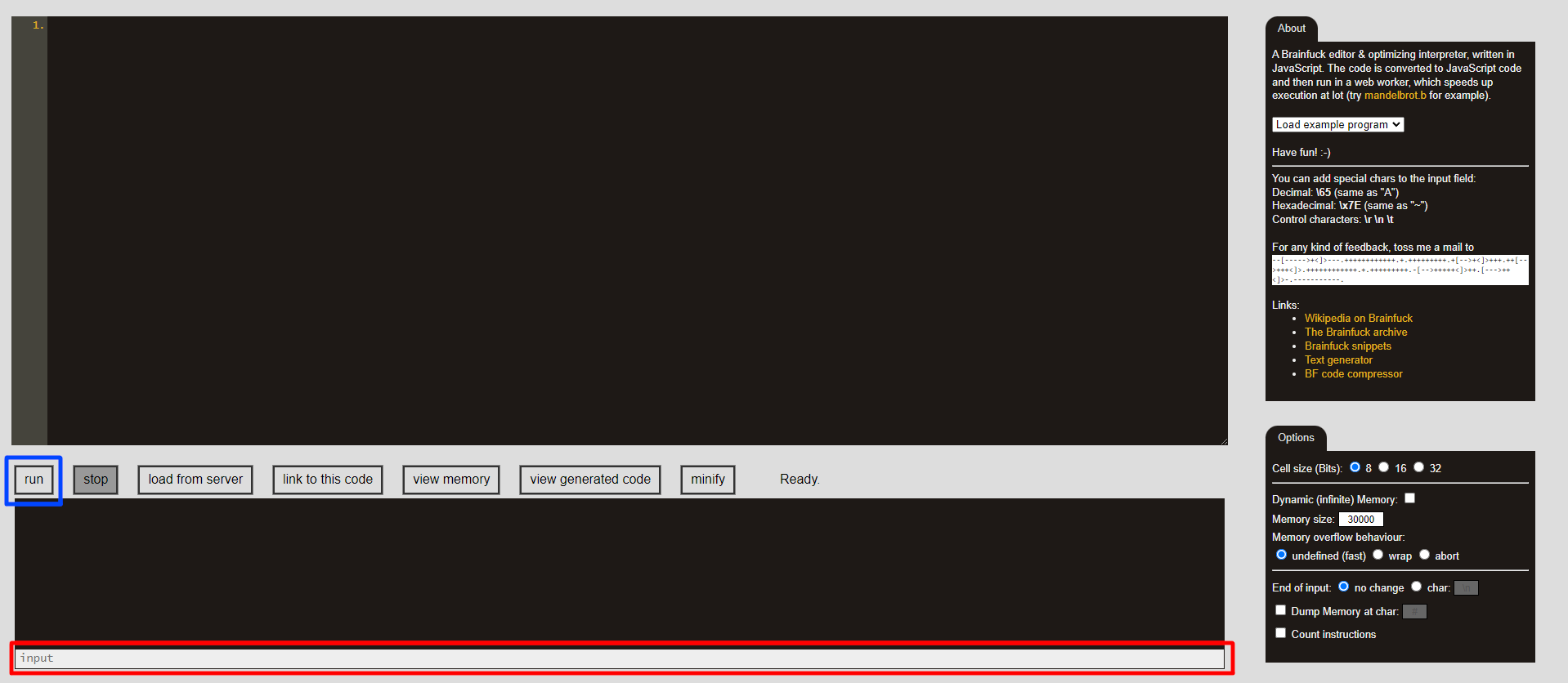
So if you want to add 3 and 4, type 3 4 into the input box. Then hit run, and the output to the console will be the sum of your inputs.
Conclusion
Unfortunately, this program will only work when the sum of the inputted numbers is less than 10. This is because ASCII numbers only go up to 9. So to output 10 or more, you’d need to detect when the sum is greater than 9, and output the correct series of numbers.