Hello World! Program
A basic “Hello World!” program gives the user the ability to manipulate the contents of the cells and output their values. This also considers ASCII values and how we can get them.
Step 1 - Printing the first character: ‘H’
The way we plan on printing out “Hello World!” is to print out each individual character. First, we will print ‘H’. To know what ASCII value corresponds to ‘H’, we look at the ASCII table and see that it is 72.
Thus we need to make a cell’s value equal to 72, then output it.
Incrementing the cell 0 by 72 by typing + 72 times is redundant, which is why we plan on using while-loops to decrease the work needed for us.
First, we increment cell 0 by 8. Then, to get 72, we begin a while loop where we:
- decrease cell 0 by 1
- move the data pointer to the right by 1 (now at cell 1)
- add 9 to cell 1
- move the data pointer to the left by 1 (now at cell 0).
The while-loop above will execute 8 times, which will give cell 1 the value of 8 * 9 = 72.
After the while-loop executes, we move the data pointer to the right (since we are still at cell 0) and output the value at cell 1. The code should look like this:
++++++++                    Adds 8 to cell 0
[->+++++++++<]              Via pointer moving adds 72 to cell 1
>.                          Prints 'H' (ASCII value 72)
Step 2 - Print the rest of “Hello”
We will now follow similar steps to print the other characters of “Hello”.
The ASCII value of ‘e’ is 101. Since cell 1 has the value of 72, we will need to increment it by 101 - 72 = 29. The best way to do this in the shortest amount of code is the following:
- move the data pointer to 0 and increment by 4
- begin a while loop where we:
- decrease cell 0 by 1
- move the data pointer to the right by 1 (now at cell 1)
- add 7 to cell 1
- move the data pointer to the left by 1 (now at cell 0).
By this, the value of cell 1 is now 72 + 4 * 7 = 72 + 28 = 100, 1 short of 101. All we need to do is to move the data pointer to the right by 1, add 1, then output cell 1’s value (100 + 1 = 101).
The code to output 0 should look like this:
<++++                       Moves data pointer to 0 and adds 4
[->+++++++<]                Via pointer moving adds 28 to cell 1 (72+28 = 100)
>+.                         Adds 1 to cell 1 (100 plus 1 = 101) and prints 'e' (ASCII value 101)
Since the ASCII value of ‘l’ is 108, we don’t need to use another while-loop since cell 1’s current value of 101 is rather close and would need fewer characters. Two ‘l’ characters in a row means we can output twice once we reach 108.
All you need is to increment cell 1 by 7 and output twice (101 + 7 = 108).
Type the following to output ‘ll’:
+++++++.. Adds 7 to cell 1 (101 plus 7 = 108) and prints 'l' (ASCII value 108) twice ('ll')
The above steps are similar for outputting ‘o’, which has an ASCII value of 111. We can achieve this by incrementing cell 1 by 3 and outputting the result (108 + 3 = 111):
+++. Adds 3 to cell 1 (108 plus 3 = 111) and prints 'o'
Step 3 - Print a space character (‘ ‘)
The ASCII value for a space character is 31. Since we cell 1’s value is 111, we need to subtract it by 80 (111 - 80 = 31). We can output a space by doing the following:
- move the data pointer to 0 and increment by 8
- begin a while loop where we:
- decrease cell 0 by 1
- move the data pointer to the right by 1 (now at cell 1)
- subtract 10 to cell 1
- move the data pointer to the left by 1 (now at cell 0).
Cell 1’s value is now (111 - 8 * 10 = 111 - 80 = 31), which is what we need to output a space character. Now move the data pointer to the right to cell 1 and output its value as such:
<+++++++                    Moves data pointer to 0 and adds 8
[->----------<]             Via pointer moving subtracts 80 from cell 1 (111 minus 80 = 31)
>+.                         Adds 1 to cell 1 (31 plus 1 = 32) and prints space (ASCII value 32)
Step 4 - Print “World”
Our process of giving cell 0 a value, decreasing it while adding/subtracting another value in cell 1 will hold for many characters here.
The ASCII value for ‘W’ is 87. With cell 1’s value of 33, we can give cell 0 the value of 5, increase cell 1 by 11 that many times then output the result:
<+++++                      Moves data pointer to 1 and adds 5
[->+++++++++++<]            Via pointer moving adds 55 to cell 1 (32 plus 55 = 87)
>.                          Prints 'W' (ASCII value 87)
The ASCII value for ‘o’ is 111. With cell 1’s value of 87, we can give cell 0 the value of 4, increase cell 1 by 6 that many times then output the result:
<++++                       Moves data pointer to 0 and adds 4
[->++++++<]                 Via pointer moving adds 24 to cell 1 (87 plus 24 = 111)
>.                          Prints 'o' (ASCII value 111)
For the rest of “World”, it is easier to increment/decrement cell 1 by a given value.
For ‘r’, its ASCII value is 114. Add 3 to cell 1 as such:
+++. Adds 3 to cell 1 (111 plus 3 = 114) and prints 'r' (ASCII value 114)
Then for ‘l’, its ASCII value is 108. Subtract 6 from cell 1 as such:
------. Subtracts 6 from cell 1 (114 minus 6 = 108) and prints 'l' (ASCII value 108)
Finally for ‘d’, its ASCII value is 100. Subtract 8 from cell 1 as such:
--------. Subtracts 8 from cell 1 (108 minus 8 = 100) and prints 'd' (ASCII value 100)
Step 5 - Print ‘!’
The ASCII value for ‘!’ is 33. We will use the while-loop method from before by giving cell 0 a value of 6 and decreasing cell 1 by 11 each time. Cell 1’s value now is (100 - 6 * 11 = 100 - 66 = 34) which is 1 above 33.
To account for this, move the data pointer to the right by 1 and decrement cell 1’s value by 1 (34 - 1 = 33) and output the result:
<++++++                     Moves data pointer to 0 and adds 6
[->-----------<]            Via pointer moving subtracts 66 from cell 1 (100 minus 66 = 34)
>-.                         Subtracts 1 from cell 1 (34 minus 1 = 33) and prints '!' (ASCII value 33)
Final Program
The finished program should look something like this:
This program prints "Hello World!" to the console

++++++++                    Adds 8 to cell 0
[->+++++++++<]              Via pointer moving adds 72 to cell 1
>.                          Prints 'H' (ASCII value 72)

<++++                       Moves data pointer to 0 and adds 4
[->+++++++<]                Via pointer moving adds 28 to cell 1 (72+28 = 100)
>+.                         Adds 1 to cell 1 (100 plus 1 = 101) and prints 'e' (ASCII value 101)

+++++++..                   Adds 7 to cell 1 (101 plus 7 = 108) and prints 'l' (ASCII value 108) twice ('ll')

+++.                        Adds 3 to cell 1 (108 plus 3 = 111) and prints 'o'

<+++++++                    Moves data pointer to 0 and adds 8
[->----------<]             Via pointer moving subtracts 80 from cell 1 (111 minus 80 = 31)
>+.                         Adds 1 to cell 1 (31 plus 1 = 32) and prints space (ASCII value 32)

<+++++                      Moves data pointer to 1 and adds 5
[->+++++++++++<]            Via pointer moving adds 55 to cell 1 (32 plus 55 = 87)
>.                          Prints 'W' (ASCII value 87)

<++++                       Moves data pointer to 0 and adds 4
[->++++++<]                 Via pointer moving adds 24 to cell 1 (87 plus 24 = 111)
>.                          Prints 'o' (ASCII value 111)

+++.                        Adds 3 to cell 1 (111 plus 3 = 114) and prints 'r' (ASCII value 114)

------.                     Subtracts 6 from cell 1 (114 minus 6 = 108) and prints 'l' (ASCII value 108)

--------.                   Subtracts 8 from cell 1 (108 minus 8 = 100) and prints 'd' (ASCII value 100)

<++++++                     Moves data pointer to 0 and adds 6
[->-----------<]            Via pointer moving subtracts 66 from cell 1 (100 minus 66 = 34)
>-.                         Subtracts 1 from cell 1 (34 minus 1 = 33) and prints '!' (ASCII value 33)
After running the program, the following should appear in the output console: 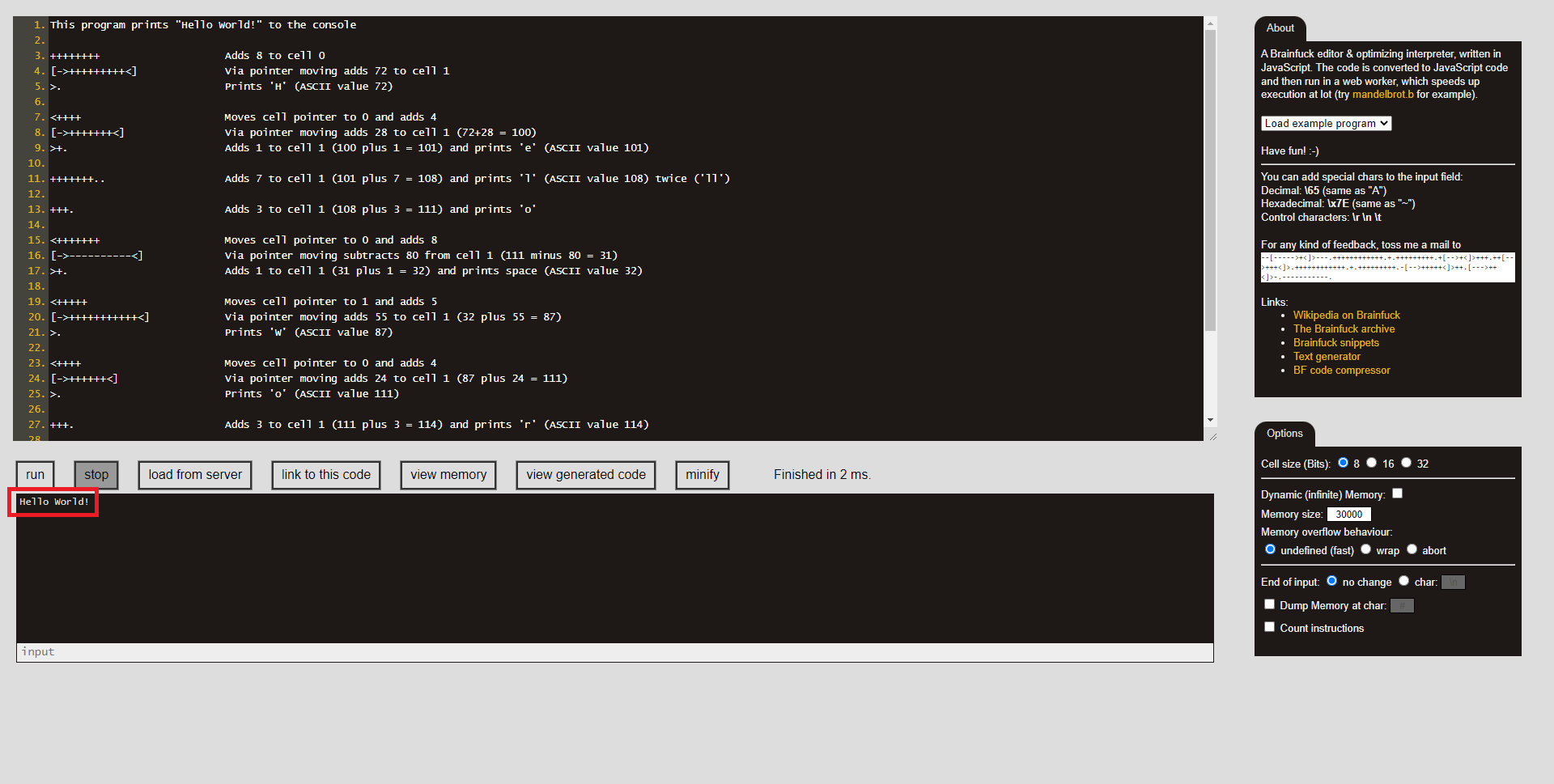
Conclusion
For more advanced users, you can check out a more advanced version of “Hello World!” on Wikipedia.